
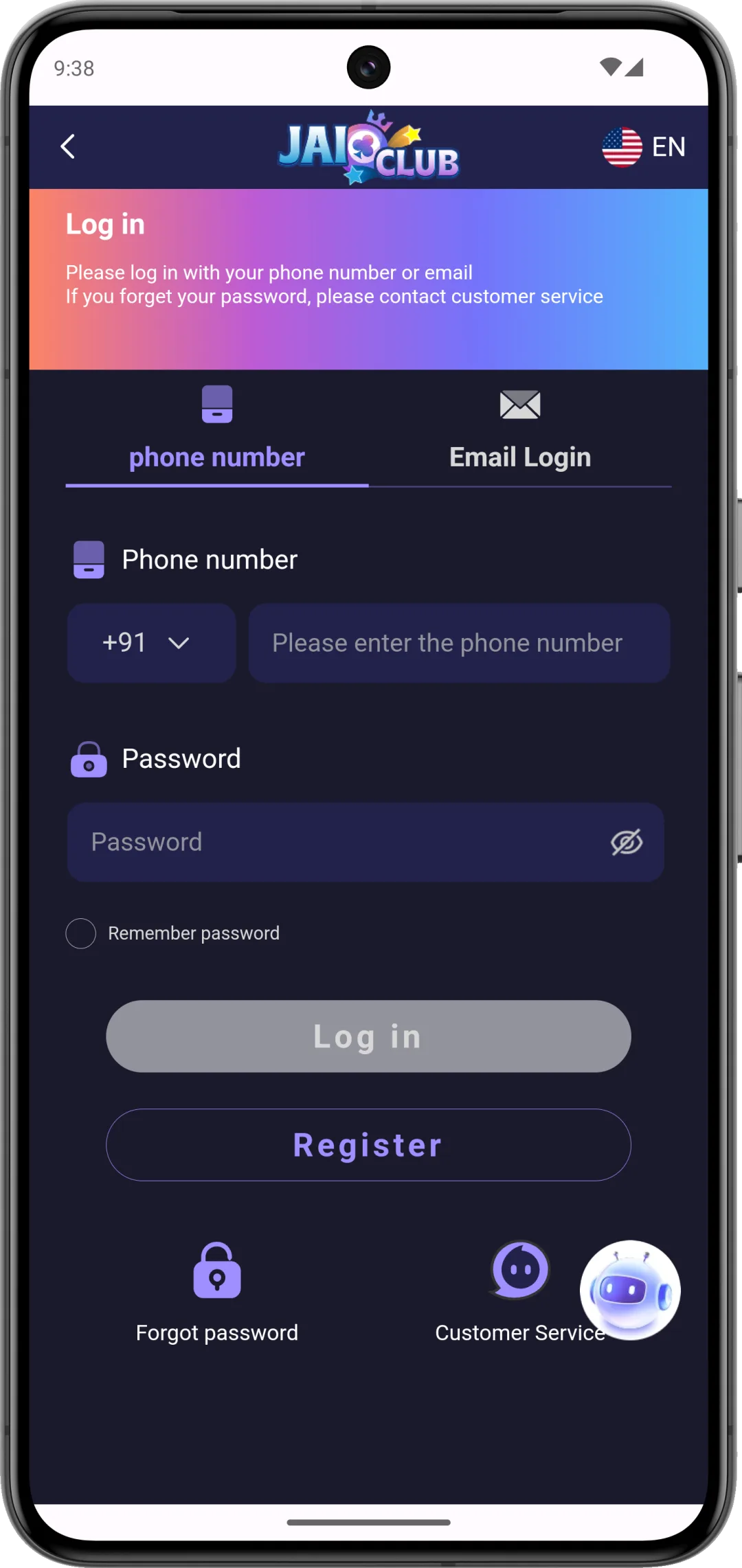
- Enter your 10-digit mobile number (no +91)
- Enter your password
- Tap Login
Not registered yet? Create an account here using invite code 4674121553018.
1. How to log in to Daman Games — step by step
-
Step 1 — Open the Daman Games login page
Open your browser and visit damanworld.asia/#/login, or open the Daman Games app and tap Login. The login form loads with a mobile number field and a password field.
Only use the official URL: damanworld.asia — beware of phishing copies. See Section 4 for how to spot fake login pages. -
Step 2 — Enter your registered mobile number
Enter your 10-digit Indian mobile number — the exact number you used when creating your account. Do not add the +91 country code — the field expects only the 10-digit number. Your mobile number is your permanent Daman Games user ID.
Example: if your number is +91 98765 43210, enter 9876543210 only.
-
Step 3 — Enter your password
Type your account password. Tap the eye icon (if visible) to show the password and confirm what you have typed. If you cannot remember your password, do not guess repeatedly — multiple wrong attempts trigger a temporary account lock. Instead, tap Forgot Password (see Section 2).
-
Step 4 — Tap Login
Tap the Login button. If your credentials are correct, you are redirected to the Daman Games home screen within 3–5 seconds. Your wallet balance, game lobby and profile are all accessible immediately after login.
If you see an error message instead, go to Section 5 — Login problems and fixes.
2. Forgot password — OTP reset guide
If you have forgotten your Daman Games password, you can reset it via OTP sent to your registered mobile number. You cannot reset via email — Daman Games does not support email-based recovery.
How to reset your Daman Games password
- Open the login page at damanworld.asia/#/login.
- Tap Forgot Password (usually below the login button).
- Enter your registered mobile number (10 digits, no +91).
- Tap Send OTP. A 6-digit one-time password arrives by SMS within 60 seconds.
- Enter the OTP in the verification field.
- Type your new password (6–16 characters) and confirm it.
- Tap Submit (or Confirm, depending on your app version). Your password is updated instantly.
- You are automatically logged in to your account.
What if I no longer have my registered mobile number?
If you have lost access to the SIM registered to your Daman Games account, OTP-based password reset will not work. You must contact Daman Games support via @Damangamess_bot on Telegram and provide:
- Your old mobile number (that was registered)
- Your PAN card (the same one submitted during KYC)
- A brief explanation of why you lost access to the number
Account recovery with a changed number is handled manually and can take several business days. This is why it is critical to keep your registered SIM active for as long as you have a Daman Games account. See Section 6 for more details.
3. Logging in on multiple devices
Daman Games allows you to be logged in on multiple devices simultaneously. Your wallet balance, game history and profile are synced in real time across all sessions. Common multi-device setups:
- Mobile + desktop — log in on your Android phone and a browser on your laptop at the same time. Both sessions stay active.
- Multiple phones — if you switch phones, you can log in on the new device without logging out of the old one.
- Shared family device — only you should access your account. Do not share your login credentials with family members or friends, even if they want to "check your balance".
Logging in after switching phones
When you switch to a new Android or iOS device:
- Open the browser on the new phone and go to damanworld.asia/#/login.
- Enter your mobile number and password.
- Your account loads immediately with your full wallet balance and history.
There is no device-transfer or account-migration process — the account is tied to your mobile number, not your device.
4. Keeping your Daman Games account secure
Daman Games accounts are targeted by credential-stuffing attacks and phishing attempts. Here is how to protect your account:
Choose a strong, unique password
Use a password you do not use on any other site or app. Daman Games accounts are targeted because they hold wallet balances. A password like DamanVIP2026! is far stronger than 123456 or your date of birth. The password field accepts 6–16 characters — use the maximum length and include numbers and letters.
Recognise fake login pages (phishing)
Phishing sites copy the Daman Games login page design to steal credentials. Red flags:
- The URL is not damanworld.asia — watch for misspellings like damanworld.asia.xyz, daman-login.com, damanworldasia.net
- The link was shared via Telegram, WhatsApp or a "prediction channel"
- The page asks for your OTP or asks you to "verify" your account via a chat window
- The page looks slightly different from the one you normally use (different colours, different button layout)
Always type the login URL directly in your browser or use a saved bookmark. Never click login links from Telegram messages.
Never share your OTP or password
Daman Games official support (@Damangamess_bot) will never ask for your OTP or password. Anyone asking for these — even someone claiming to be from Daman Games or a "VIP support agent" — is attempting to steal your account.
Log out on shared devices
If you access your account on a shared or public device (internet café, family tablet), always log out when done. Your session remains active until you explicitly log out or it times out after an extended period of inactivity.
5. Seven common Daman Games login problems and fixes
Problem 1: "Wrong password" error
What you see: An error message saying your password is incorrect.
Fix: First confirm you are entering the correct password by toggling the eye icon to view what you typed. Check for: accidental spaces at the start or end, caps lock being on, or the keyboard autocorrecting your password. If you still cannot log in after two careful attempts, use Forgot Password to reset via OTP rather than continuing to guess — accounts can be temporarily locked after multiple wrong attempts.
Problem 2: "Account not found" or wrong mobile number
What you see: An error saying the account does not exist or the mobile number is not registered.
Fix: Check you are entering your 10-digit number without the +91 country code. Check you are using the correct number — if you have multiple SIMs, try the other number. If you registered recently and still cannot log in, wait 30 minutes (some new accounts take time to activate) and try again.
Problem 3: Account temporarily locked
What you see: A message saying the account is locked or too many login attempts.
Fix: Wait 15–30 minutes and try again. Do not attempt more logins during this period. After the lockout expires, use Forgot Password to reset your credentials rather than guessing again. If the lock persists beyond 2 hours, contact support at @Damangamess_bot.
Problem 4: Login page not loading or ISP block
What you see: The page times out, shows a "This site cannot be reached" error, or redirects to a telecom notice.
Fix: (1) Switch from Wi-Fi to mobile data (or vice versa) — some ISPs block on only one. (2) Try a different browser (Chrome vs Firefox vs Samsung Internet). (3) Daman Games is periodically blocked by some Indian ISPs; if it loads on one network but not another, the block is carrier-specific. We do not recommend using a VPN to bypass blocks on real-money gaming sites.
Problem 5: App cache / blank screen after login
What you see: You enter correct credentials, the login button spins but nothing happens, or you see a blank/white screen.
Fix: Clear the app cache. On Android: Settings → Apps → Daman Games (or the browser you use) → Storage → Clear Cache. Do not clear data (that would delete your session tokens and locally stored credentials). Restart the app and try logging in again.
Problem 6: OTP not received during password reset
What you see: You requested an OTP for password reset but it has not arrived after 2 minutes.
Fix: (1) Confirm your mobile number was entered correctly. (2) Check your carrier's DND settings — some plans block promotional SMS. (3) Try switching to a different SMS app as the default receiver. (4) During peak hours (7 PM–10 PM IST), OTP delivery can be delayed by up to 5 minutes — wait before requesting a resend. (5) If the number has been ported to a new carrier recently, SMS routing can lag by up to 24 hours. In this case, contact support directly.
Problem 7: "Account disabled" or "Account suspended"
What you see: A message saying your account has been suspended, disabled, or banned.
Fix: Account suspensions on Daman Games can result from: (a) violation of terms (multiple accounts, bonus abuse, suspicious betting patterns), (b) KYC rejection with no re-submission, or (c) in rare cases, an error on Daman Games' side. Contact support at @Damangamess_bot immediately. Request the specific reason in writing. If the suspension is related to a withdrawal that has not been paid out, document the conversation carefully as the situation may require escalation.
6. Lost access to your registered mobile number
This is one of the most serious account situations. Since Daman Games uses your mobile number as both your user ID and your password recovery channel, losing the SIM means you cannot reset your password via OTP.
Steps to take if you lost your registered SIM
- Contact Daman Games support immediately via Telegram @Damangamess_bot.
- Explain that you no longer have access to your registered mobile number.
- Prepare the following for identity verification:
- The original registered mobile number
- Your PAN card (the one used during KYC)
- Your Aadhaar card
- Bank statement for the account used for deposits/withdrawals
- The support team will verify your identity and may request a live selfie or video verification.
- If approved, your account is linked to a new mobile number. This process takes several business days.
Prevention: keep your registered SIM active
Indian prepaid SIMs deactivate if not recharged within 60–90 days (varies by carrier). Even if you stop using Daman Games for a period, ensure your registered SIM stays active with at least a minimal recharge. Losing access to a ₹10,000+ wallet due to an expired SIM is entirely avoidable.
7. Frequently asked questions
How do I log in to Daman Games?
Visit damanworld.asia/#/login, or open the Daman Games app and tap the Login button. The form loads with a mobile number field and a password field. Enter your 10-digit registered mobile number without the +91 country code — this number is your permanent Daman Games user ID and cannot be changed later. Type your account password, tap the eye icon if you want to confirm what you typed, then tap Login. If your credentials are correct, you are redirected to the home screen within 3–5 seconds, with your wallet balance, game lobby and profile all accessible immediately. On a stable connection the whole process takes under 2 minutes. If you see an error message instead, work through the common login problems listed above rather than repeatedly retrying the same password. If you have not registered yet, create an account first using invite code 4674121553018 to be eligible for the welcome bonus.
How do I reset my Daman Games password?
On the login page, tap Forgot Password — usually located just below the Login button. Enter your registered 10-digit mobile number (no +91) and tap Send OTP. A 6-digit one-time password arrives by SMS within about 60 seconds; it expires after a couple of minutes, so enter it promptly. Type the OTP into the verification field, then create and confirm a new password between 6 and 16 characters — avoid reusing a password from another app, since Daman Games accounts are targeted by credential-stuffing attacks. Once confirmed, your password updates instantly and you are logged in automatically, no separate login step needed. This entire reset relies on access to your registered mobile number, so if your carrier's SMS is delayed, check DND settings before assuming it failed. If you no longer have the SIM registered to your account, OTP reset will not work — contact @Damangamess_bot on Telegram for manual recovery instead.
Why is the Daman Games login page not loading?
The most common cause is an ISP-level block on damanworld.asia — several Indian carriers periodically restrict access to real-money gaming domains. Start by switching from Wi-Fi to mobile data, or the reverse; if the site loads on one network but not the other, the block is carrier-specific rather than a problem with the site itself. Next, try a different browser (Chrome, Firefox or Samsung Internet), since cached DNS records can keep pointing at a blocked route. We do not recommend using a VPN to bypass the block: circumventing blocks on real-money gaming sites can carry legal implications depending on your state. If the page loads but hangs on a blank screen after entering credentials, that is usually an app cache issue rather than a network block — clearing the app's cache (not its data) often resolves it. If none of this works, the issue may be a brief server maintenance window; try again after 15–30 minutes.
Can I log in to Daman Games without my mobile number?
No. Your 10-digit registered mobile number functions as your permanent Daman Games user ID — there is no username, email address or alternative identifier that can be used to log in instead. Daman Games does not offer email-based registration or email-based account recovery, so the mobile number you registered with is the only path into your account, both for normal logins and for password resets via OTP. This is deliberate: tying the account to a verified phone number makes it harder for someone else to take over your login. If you have lost access to your registered number — for example the SIM was deactivated after non-payment or you switched carriers and lost the old number — you cannot simply log in with a new number. You must contact Daman Games support at @Damangamess_bot on Telegram and go through manual identity verification, which typically requires your PAN card and takes several business days to complete.
I changed my phone — how do I log in on the new device?
Open a browser on your new phone and go to damanworld.asia/#/login, then enter the same registered mobile number and password you have always used — there is no device-transfer or migration process to run through. Your account is tied to your mobile number, not to the physical device, so as soon as you log in successfully your wallet balance, game history and profile load immediately, exactly as they appeared on your old phone. You can also install the Daman Games app on the new device and log in the same way if you prefer the app over the browser. One thing to double-check first: make sure you still have access to the SIM registered to your account, since that number is also used for OTP-based password resets. If you changed phones but kept the same SIM, this is a non-issue. If you changed both the phone and the number, see the FAQ above on losing access to your registered number.
How do I log out of Daman Games?
Open the app or your browser session and go to your Profile — usually the icon in the top-right corner of the screen — then tap Logout or Sign Out. You are returned to the login screen, and your session on that device ends immediately. It is worth making a habit of logging out whenever you use a shared or public device, such as an internet café computer or a family tablet, since your session otherwise stays active until you explicitly end it or it times out after an extended period of inactivity. Logging out on one device does not affect sessions on your other devices — Daman Games allows simultaneous logins across multiple phones and browsers, and each session is independent. If you ever suspect someone else has accessed your account, log out everywhere you can, change your password immediately via Forgot Password, and contact Daman Games customer support to flag the concern.
→ Log In to Daman Games ← Back to full guide
Related guides
How to Register on Daman Games
New user? Step-by-step registration guide with invite code 4674121553018.
Deposit & Withdrawal Guide
UPI deposit steps, KYC requirements and withdrawal timelines.
Daman Games Customer Support
How to contact support, what issues they can fix, and realistic response times.